



GoVIP Offer: Get 16+ OTT Membership at Just ₹1 (Limited Time Deal)
OTT subscriptions have become an essential part of digital entertainment in India. 16+ OTT Platforms like Amazon Prime Video, SonyLIV, and ZEE5 offer premium movies, web series, live sports, and exclusive originals. However, subscribing to all these platforms individually can be costly.

Thank you for reading this post, don't forget to subscribe!
But what if you could enjoy Amazon Prime, SonyLIV, and ZEE5 memberships together at just ₹1?
Yes, you read that right!
With the Go VIP Platinum Membership, users can unlock multiple OTT subscriptions at an unbelievable price of ₹1 only for 3 months.
In this article, we will explain how the Go VIP ₹1 offer works, step-by-step instructions to claim it, important things to note, and whether this deal is worth trying.
What is Go VIP?
Go VIP is an online membership platform that provides users access to exclusive deals, discounts, and bundled subscriptions. One of its most viral offers right now is the Go VIP Platinum Quarterly Plan, where users can enjoy premium OTT subscriptions at a highly discounted price using a coupon code.
🔗 Official Website: 👉 https://www.govip.one/govip/
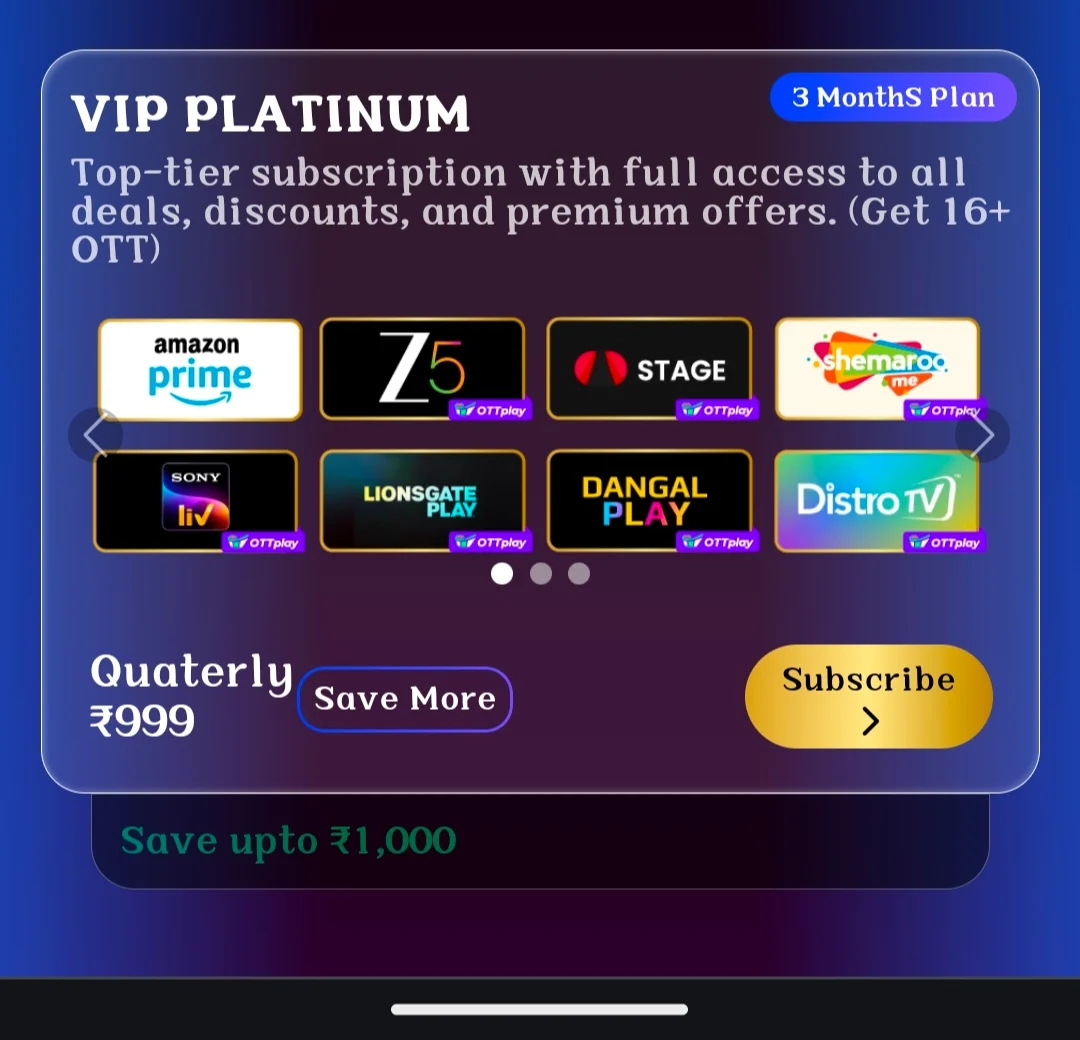
Go VIP ₹1 OTT Membership Offer – Highlights
-
🎬 Amazon Prime Video Membership
-
📺 SonyLIV Premium Access
-
🎞️ ZEE5 Subscription
-
⏳ Valid for 3 Months
-
💰 Final Price: ₹1 only
-
🔥 Massive discount using coupon code
This offer is especially useful for users who love streaming movies, web series, and live sports without paying high monthly fees.
Step-by-Step Guide to Get Go VIP Membership at ₹1
Follow these simple steps carefully to claim the offer successfully:
Step 1: Visit the Official Go VIP Website
Go to the official offer page using this link:
👉 https://www.govip.one/govip/
Step 2: Click on “Buy Now”
On the homepage, click on the Buy Now button to proceed.
Step 3: Login with Mobile Number
Enter your mobile number and complete the login using OTP verification.
Step 4: Choose 3-Month Membership
Select the VIP Platinum – Quarterly Plan.
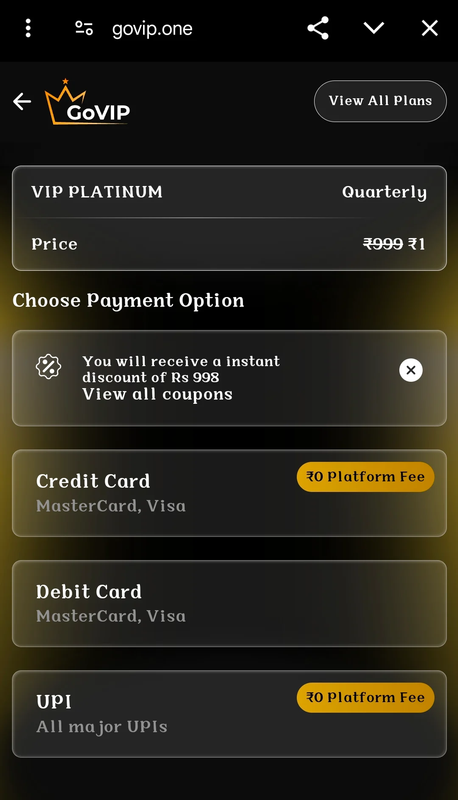
Step 5: Apply Coupon Code
At checkout, apply the coupon code: 👉 GOVIPONE
After applying the coupon, the price will drop drastically, making the final payable amount ₹1 only.
Step 6: Make Payment (Important)
-
✅ Use Credit Card or Debit Card
-
❌ UPI is NOT working for this offer
Complete the payment using card only.
Step 7: Enjoy OTT Memberships
Once payment is successful, you can enjoy Amazon Prime, SonyLIV, and ZEE5 memberships as per the offer terms.
Important Note: Cancel Autopay After Payment ⚠️
This is a very important step.
📌 After completing the payment, make sure to cancel the auto-pay / subscription renewal from your card or Go VIP account settings.
Failing to do so may result in auto-deduction after the trial or offer period ends.
Is the Go VIP ₹1 Offer Legit?
The Go VIP ₹1 deal works as a promotional discounted subscription where users get a huge coupon benefit. However, like most trial or discounted offers:
-
You should read terms and conditions carefully
-
Always cancel auto-renewal after payment
-
Use a card you can manage easily
Many users try such deals to enjoy short-term OTT access at minimal cost.
Who Should Try This Offer?
This deal is ideal for:
-
🎥 OTT lovers who want multiple platforms together
-
💸 Users looking for low-cost entertainment
-
📱 People who don’t want separate subscriptions
-
🎯 Short-term binge watchers
Final Verdict :
The Go VIP ₹1 Amazon Prime, SonyLIV & ZEE5 Membership offer is one of the most affordable OTT bundle deals available right now. If you follow the steps correctly, apply the coupon code GOVIPONE, and remember to cancel auto-pay, you can enjoy premium content at almost zero cost.
🔥 Don’t miss this limited-time deal — try it once and binge responsibly!
How to Cancel Auto-Pay / Mandate for Credit & Debit Cards on Go VIP
After successfully availing the Go VIP ₹1 OTT membership offer, it is highly recommended to cancel the auto-pay (mandate) linked to your credit or debit card. This will help you avoid any unexpected charges once the discounted or trial period ends.
Go VIP provides an easy in-app option to revoke the mandate. Just follow the steps below carefully.
Steps to Cancel Mandate on Go VIP (Credit/Debit Card)
-
Login to your Go VIP account
Visit the official website and log in using your registered mobile number. -
Go to Order History
After logging in, navigate to the “Order History” section from your account dashboard. -
Open Subscription & Membership
Inside Order History, click on “Subscription & Membership” to view your active plans. -
Select Revoke Mandate
Look for the “Revoke Mandate” option related to your active Go VIP subscription. -
Confirm Mandate Cancellation
Confirm the action to successfully cancel auto-pay for your credit or debit card.
Once the mandate is revoked, no future amount will be deducted automatically from your card.
Why Cancelling the Mandate is Important?
-
🚫 Prevents unwanted auto-renewal charges
-
💳 Protects your credit/debit card from future deductions
-
🔐 Gives you full control over your subscription
-
✅ Safe way to enjoy the ₹1 offer without risk
Many promotional OTT offers are based on auto-renewal models, so cancelling the mandate on time is always a smart and safe practice.
Final Tip for Users
Always complete the mandate cancellation immediately after payment or within the same day. This ensures you enjoy the Amazon Prime, SonyLIV, and ZEE5 access without worrying about future billing.