



ChatGPT ₹399 Refund: How to Cancel Subscription and Get Your Money Back
Many ChatGPT users subscribe to paid plans to enjoy premium features, but sometimes they forget to cancel their subscription before the next billing date. As a result, the subscription amount may be automatically deducted from their bank account through Google Play or UPI AutoPay.

Thank you for reading this post, don't forget to subscribe!
If ₹399 has been deducted from your bank account for a ChatGPT subscription and you no longer wish to continue, you can cancel the subscription and request a refund from OpenAI.
In this article, we will explain how to request a ChatGPT ₹399 refund, cancel your subscription, and check the refund status.
Why Was ₹399 Automatically Deducted From Your Bank Account?
When you subscribe to ChatGPT through Google Play, you may authorize automatic recurring payments using UPI AutoPay.
Once the subscription is activated, the payment system can automatically deduct the subscription fee on the next billing date unless you cancel the subscription before renewal.
For example, a user may have subscribed to ChatGPT using an SBI bank account linked to Google UPI AutoPay. When the subscription renews, ₹399 may be automatically deducted from the account.
If you no longer want to use the paid subscription, you should cancel it to prevent future automatic payments.
However, remember that cancelling a subscription does not automatically refund the amount already deducted. You must separately submit a refund request to OpenAI.
How to Request a ChatGPT ₹399 Refund?
If your subscription was purchased through Google Play, you can request a refund through the OpenAI Help Center.
Follow these steps:
Step 1: Open the OpenAI Help Center
Visit the official OpenAI Help Center:
Step 2: Log in to Your ChatGPT Account
Make sure you are logged in using the same ChatGPT account that was used to purchase the subscription.
This is important because OpenAI needs to verify the account associated with the payment.
Step 3: Open the Chat Support Option
Look for the chat support icon, usually displayed at the bottom-right corner of the Help Center.
Tap it to start a conversation with OpenAI Support.
Step 4: Select Billing and Refund
Explain that ₹399 was automatically deducted from your bank account for a ChatGPT subscription and that you want to cancel the subscription and request a refund.
You can provide the payment date, amount, and purchase details to help identify the transaction.
Step 5: Submit Your Refund Request
Follow the instructions provided by the support assistant.
OpenAI will review your request and determine whether the payment qualifies for a refund.
You can also visit the official refund instructions here:
https://help.openai.com/en/articles/7232895-how-do-i-request-a-refund-for-my-chatgpt-subscription
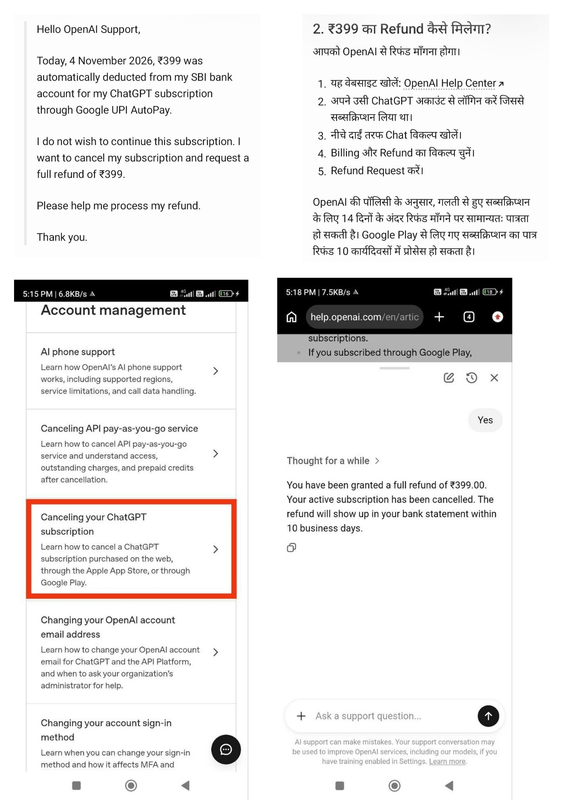
ChatGPT ₹399 Refund Request Message
If you are unsure what to write to OpenAI Support, you can use the following message:
Hello OpenAI Support,
₹399 was automatically deducted from my SBI bank account on 4 November 2026 for my ChatGPT subscription through Google UPI AutoPay.
I do not wish to continue this subscription. I would like to cancel my subscription and request a full refund of ₹399.
Please help me process my refund.
Thank you.
How to Cancel Your ChatGPT Subscription?
Requesting a refund and cancelling your subscription are two different things.
To prevent future automatic deductions, you should also cancel your subscription through Google Play.
Follow these steps:
- Open the Google Play Store on your smartphone.
- Tap your profile picture.
- Select Payments & subscriptions.
- Tap Subscriptions.
- Select ChatGPT.
- Tap Cancel subscription.
- Follow the instructions to confirm cancellation.
After cancellation, check whether the subscription status shows that it will not renew.
You can also manage your subscription through the official Google Play website:
https://play.google.com/store/account/subscriptions
Important: Uninstalling the ChatGPT app does not cancel your subscription. You must cancel it through the platform where you purchased it.
How Long Does a ChatGPT Refund Take?
The refund processing time depends on where you purchased your subscription.
According to OpenAI’s current refund guidance:
- Google Play subscriptions: Eligible refunds are processed by OpenAI within 10 business days.
- Subscriptions purchased directly through ChatGPT: Eligible refunds are generally processed within 5–7 business days.
- The time taken for the refunded amount to appear in your bank account may depend on your bank’s processing time.
Refund approval is not guaranteed for every request.
OpenAI generally treats subscription payments as non-refundable, but exceptions may apply depending on the circumstances, applicable laws, and refund eligibility.
For Google Play subscriptions, OpenAI’s current guidance states that accidental purchases may generally qualify for a refund if the request is submitted within 14 days of the charge.
Always check the latest refund policy before submitting your request.
What If Your Refund Request Is Rejected?
If your refund request is rejected, you can contact OpenAI Support again and explain your situation.
Make sure you provide accurate payment details and explain why you no longer wish to continue the subscription.
If you believe the charge was unauthorized or incorrect, clearly mention that in your support request.
For unauthorized transactions, you may also contact your bank or payment provider for assistance.
Do not share your UPI PIN, OTP, or complete banking credentials with anyone claiming to help you obtain a refund.
Important Things to Remember
Before requesting a ChatGPT refund, keep these points in mind:
- Cancel the subscription to prevent future renewals.
- Submit the refund request using the ChatGPT account associated with the payment.
- Refund approval depends on OpenAI’s policies and your circumstances.
- Refund processing may take several business days.
- Google Play and OpenAI may have different roles in subscription management and refund processing.
- Keep your payment confirmation and refund request details for reference.
Conclusion
If ₹399 has been automatically deducted from your bank account for a ChatGPT subscription, you can request a refund through the OpenAI Help Center.
The most important steps are to log in to the correct ChatGPT account, contact support through the Help Center, submit your refund request, and cancel the subscription through Google Play to avoid future deductions.
Although refunds are not guaranteed, submitting your request promptly and providing accurate payment details can help OpenAI review your case.
Official refund support: https://help.openai.com/en/articles/7232895-how-do-i-request-a-refund-for-my-chatgpt-subscription
Disclaimer: Refund eligibility, processing times, and subscription policies may change. This article is for informational purposes only. The final refund decision is made by OpenAI or the applicable payment platform.
Note: The screenshot shows a successful refund confirmation for one user’s case. The article explains the process but does not imply every refund request will be approved.